Route 53 Explained: DNS Basics for AWS
When a site "goes down" and the servers are perfectly healthy, the culprit is often DNS. Here's what Route 53 actually does, and the settings that bite people.
DNS translates a name people type (app.example.com) into an address machines use (an IP or an AWS endpoint). Route 53 is AWS's DNS service, and it's also a domain registrar and a health-checking tool. The pieces are simple, but a few details cause most of the real-world pain.
The core building blocks
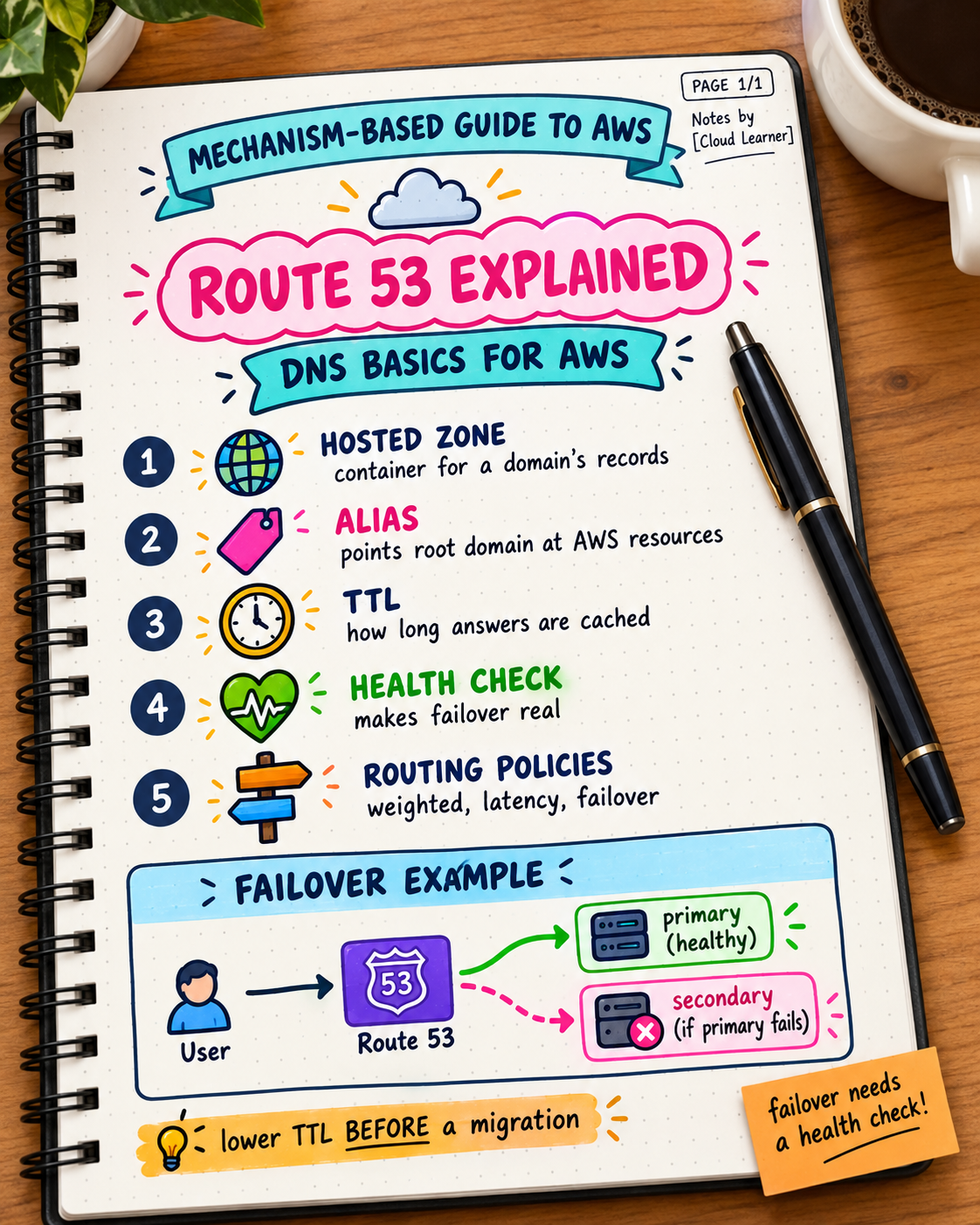
Hosted Zone: a container for all the DNS records of one domain. Public hosted zones answer queries from the internet. Private hosted zones answer only inside your VPC (Day 6), useful for internal names like db.internal.
Records: the actual name-to-answer mappings inside a hosted zone.
app.example.com   A       203.0.113.10
www.example.com   CNAME   app.example.com
example.com       A       ALIAS → my-alb-123.us-east-1.elb.amazonaws.com
The record types you'll actually use
- A: name → IPv4 address.
- AAAA: name → IPv6 address.
- CNAME: name → another name. Cannot be used at the root of a domain (
example.comitself). - Alias: a Route 53-specific record that points a name at an AWS resource (ALB, CloudFront, S3 website). Works at the domain root, and Route 53 doesn't charge for Alias queries to AWS resources.
- MX / TXT: email routing and verification records.
Why Alias exists: the root domain problem
A CNAME can't sit at the root domain, but you often want example.com (no www) to point at a load balancer. Alias solves exactly this. Also, a load balancer's underlying IPs change (Day 10), so pointing at an IP isn't an option. Alias follows the resource, not a fixed address.
Routing policies: how Route 53 decides what to answer
- Simple: one answer, always.
- Weighted: split traffic by percentage, such as sending 10% to a new version before a full rollout.
- Latency-based: answer with the region that's fastest for the user.
- Failover: answer with a primary, and automatically switch to a secondary if health checks fail.
- Geolocation: answer based on where the user is, useful for regional content or compliance.
Failover example:
Primary:   app.example.com → ALB in us-east-1  (health check attached)
Secondary: app.example.com → ALB in eu-west-1  (used only if primary fails)
The setting that quietly bites people: TTL
TTL (time to live) tells resolvers how long to cache an answer. A TTL of 86400 (24 hours) means that after you change a record, some users keep hitting the old address for up to a day. Before a planned migration, lower the TTL (to 60 or 300 seconds) a day ahead, make the change, then raise it again. Doing it the other way round is the classic "I changed DNS and nothing happened" experience.
Health checks: failover only works if something's checking
A failover record with no health check never fails over, because Route 53 has no way to know the primary is unhealthy. Health checks probe an endpoint on a schedule, and the routing policy reacts to the result.
A practical decision framework
| Situation | Reach for |
|---|---|
| Point a root domain at an ALB/CloudFront | Alias record |
| Point a subdomain at another hostname | CNAME |
| Gradual rollout of a new version | Weighted routing |
| Automatic disaster recovery switch | Failover + health checks |
| Users spread across regions | Latency-based routing |
| Internal names inside a VPC | Private hosted zone |
The mistake in both directions
- Leaving a long TTL in place right before a change you need to take effect quickly.
- Building failover records without health checks, then assuming you have disaster recovery.
Try this yourself: look up your own domain's TTL (dig example.com shows it in the answer section). If it's 24 hours and you'd need to move quickly in an incident, that's worth lowering now, while nothing is on fire.
Takeaway: Route 53 is simple at its core (names to answers) but two details decide most real outcomes: TTL controls how fast changes take effect, and failover is only real when a health check backs it. Alias records are the AWS-native way to point a domain at an AWS resource.