CloudTrail Explained: Knowing What Actually Happened
When something changes in your AWS account and nobody admits to touching it, CloudTrail is how you find out who did what, and when. The catch is that it only helps if you set it up before you need it.
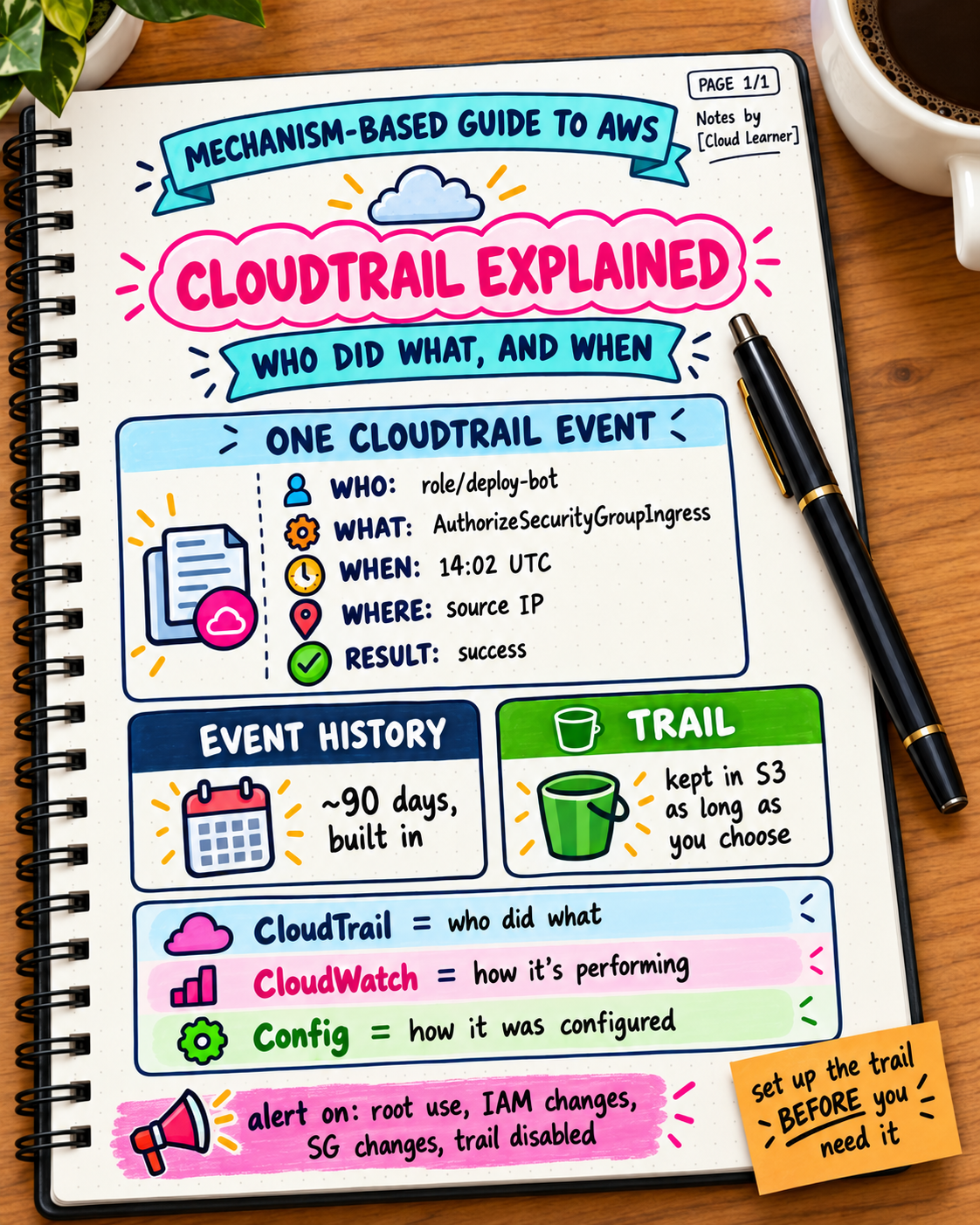
Day 20 said to start an investigation by asking what changed. CloudTrail is the service that answers that question for your AWS account. It records API activity, and most "mystery change" incidents end in a CloudTrail search.
What CloudTrail records
Every action taken through the console, CLI, SDKs, or other services is an API call. CloudTrail logs those calls, including:
Who: the identity (an IAM user, a role, or the root account) and how it authenticated
What: the action (
DeleteBucket,AuthorizeSecurityGroupIngress,TerminateInstances)When: the timestamp
From where: the source IP address and tool
The result: success, or an error such as
AccessDenied
Time: 14:02 UTC
Identity: role/deploy-bot
Action: AuthorizeSecurityGroupIngress
Parameters: port 22 from 0.0.0.0/0
Result: Success
That one entry explains a lot of "why is SSH open to the world" conversations (Day 5).
Event history vs a trail: the difference that matters
Event history: available by default in the console, showing roughly the last 90 days of management events per region. Good for quick lookups, and it can't be kept longer.
A trail: a configuration you create that delivers events to an S3 bucket (and optionally CloudWatch Logs) for as long as you choose to keep them. This is what you need for investigations that reach back further than 90 days, for audits, and for alerting.
Creating a trail after an incident doesn't recover what happened before it existed. That's why it's worth setting up early.
Management events vs data events
Management events: changes to resources (create, modify, delete, IAM changes). Recorded by default.
Data events: activity inside resources, such as S3 object reads and writes. Off by default, and they can produce a very high volume of records, so enable them deliberately for the buckets where you need them. Data events and CloudTrail Insights (which flags unusual activity) are billed separately, so check current pricing.
What CloudTrail is not
It records API activity in your account. It doesn't show what happened inside your operating system or application. Those live in logs (Day 9). Two related services are easy to confuse with it:
| Service | Answers |
|---|---|
| CloudTrail | Who made which API call, and when |
| CloudWatch | How are my resources performing, and what do the logs say |
| AWS Config | What did this resource's configuration look like over time, and is it compliant |
Turning it into alerts, not just an archive
A trail nobody reads helps only after the fact. A few events are worth alerting on, using CloudWatch alarms or EventBridge rules (Day 9):
Root account sign-in or use
Changes to IAM policies and users
Changes to security groups and network ACLs
Disabling or deleting CloudTrail itself
A burst of
AccessDeniederrors (could be a misconfiguration, or someone probing)
Common mistakes
Relying only on the 90-day Event history, then needing something older.
A trail in a single region, missing activity elsewhere. A multi-region trail avoids this.
An unprotected log bucket. Logs are evidence, so restrict who can write, delete, or change them, and turn on log file integrity validation to detect tampering.
Shared credentials, which make "who" meaningless. Individual identities and roles (Day 4) make the log useful.
Never looking until an incident, so nobody knows what normal activity looks like.
Try this yourself: open Event history and filter by event name for something like AuthorizeSecurityGroupIngress or DeleteBucket. See whether you can answer "who, when, and from where." Then check whether a multi-region trail exists that delivers to S3. If it doesn't, creating one is a small task with a large payoff later.
Takeaway: CloudTrail is the account's activity log. It answers who changed what and when, but only for the period you've been recording, so set up a multi-region trail early, protect the logs, and alert on the handful of events that matter.
About the author
- Jayesh Sojitra | AI & Frontend
Comments
Join the discussionNo comments yet. Be the first to comment.
30 Days of AI
A 30-day series breaking down AI concepts, tools, and prompts in plain, jargon-free language — for beginners and professionals who want to actually understand and use AI, not just talk about it.